-
[Javascript] async & awaitJavascript 2024. 4. 11. 10:38
async
- 함수에 async 키위드를 붙입니다.
- new Promise... 부분을 없애고 executor 본문 내용만 남깁니다.
- resolve(value); 부분을 return value; 로 변경합니다.
- reject(new Error(…)); 부분을 throw new Error(…); 로 수정합니다.
- async 함수의 리턴 값은 무조건 Promise
- 프로미스를 기반으로 동작
- 마치 동기 코드처럼 직관적으로 코딩을 할 수 있음
await
- await는 async 함수 안에만 사용할 수 있는 특별한 문법
- Promise를 반환하는 함수 앞에 await를 붙이면, 해당 Promise의 상태가 바뀔 때까지 코드가 기다림
- Promise가 성공 상태 또는 실패 상태로 바뀌기 전까지는 다음 연산을 시작하지 않음
function getMult10Promise (number) {
  return new Promise((resolve, reject) => {
    setTimeout(() => {
      resolve(number * 10);
    }, 1000);
  });
}

async function doAsyncWorks () {
  const result1 = await getMult10Promise(1);
  console.log(result1);

  const result2 = await getMult10Promise(2);
  console.log(result2);

  const result3 = await getMult10Promise(3);
  console.log(result3);
}

doAsyncWorks();
console.log('💡 이 문구가 먼저 출력됨');
- 예제
const DEADLINE = 1400;

function getRelayPromise (name, start, failMsg) {
  console.log(`👟 ${name} 출발`);

  // 💡 랜덤 시간만큼 달리고 결과를 반환하겠다는 약속을 만들어 반환
  return new Promise((resolve, reject) => {
    const time = 1000 + Math.random() * 500;

    setTimeout(() => {
      if (time < DEADLINE) {
        console.log(`🚩 ${name} 도착 - ${(start + time)/1000}초`);
        resolve(start + time);

      } else {
        console.log(failMsg);
        reject((start + time) / 1000);
      }
    }, time);
  })
}
async function relay5 () { try { const time1 = await getRelayPromise('철수', 0, '철수부터 광탈입니다. ㅠㅠ'); const time2 = await getRelayPromise('영희', time1, '영희가 완주하지 못했네요.'); const time3 = await getRelayPromise('돌준', time2, '돌준이 분발해라.'); const time4 = await getRelayPromise('정아', time3, '정아에게 무리였나보네요.'); const time5 = await getRelayPromise('길돈', time4, '아아, 아깝습니다...'); } catch (msg) { console.log(`😢 완주 실패 - ${msg}초`); } finally { console.log('- - 경기 종료 - -'); } } relay5();
네트워크 통신에서 async/ await
Fetch API
- Web API에서 제공하는 기능 - 즉 브라우저에서 제공
- 네트워크로부터 리소스를 받아오기 위한 다양하고 강력한 기능들 제공
fetch 메서드
- 네트워크 통신으로 원격에 요청을 보내고 답을 받아오는 프로미스를 반환
// 💡 결과가 Promise의 인스턴스임 확인
console.log(
  fetch('https://showcases.yalco.kr/javascript/mockserver/race-result')
);

fetch('https://showcases.yalco.kr/javascript/mockserver/race-result')
.then(response => {
  console.log(response);
  return response;
})
.then(response => response.json())
.then(console.log);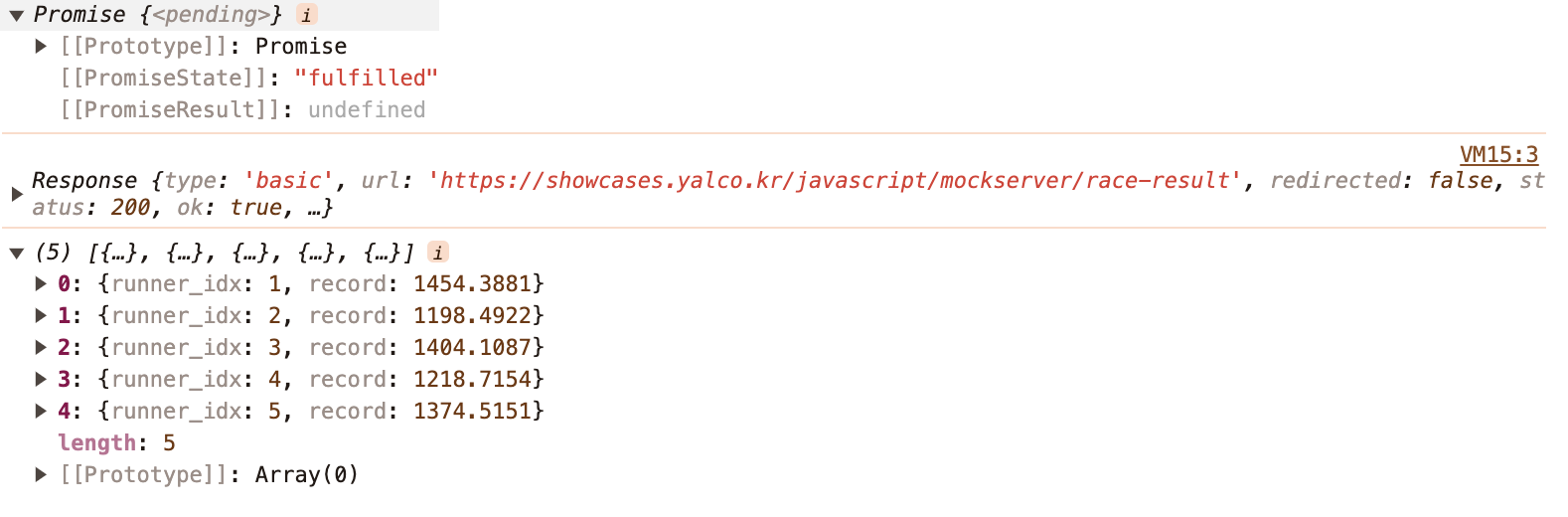
반환되는 결과 ( response )
- 요청의 결과에 대한 정보들을 담은 객체
- json 메서드 - 결과의 body로 받은 텍스트를 JSON 객체로 변환하여 반환
주소 등이 잘못된 경우 등 에러상황시 catch에서 처리
fetch('https://WRONG-ADDRESS')
.then(response => response.json())
.then(console.log)
.catch(msg => {
  console.error(`😳 에러 발생: ${msg}`)
})
.finally(() => {
  console.log('- - 통신 종료 - -')
})
'Javascript' 카테고리의 다른 글
[Javascript] 비동기 홀짝 문제 (0) 2024.04.15 [Javascript] 프로미스 (1) 2024.04.11 [Javascript] 비동기식 프로그래밍 (0) 2024.04.10 [Javascript] 프로토타입과 상속 (0) 2024.04.10 [Javascript] Prototype 프로토타입 (0) 2024.04.09